Guides
Podcast production tools: the features that matter and the ones that do not
Podcast production tools split into four jobs: capture, editing software, hosting, and measurement. Buy for the job you have, not the feature list.
What to take away
- Podcast production tools cover four jobscapture the voice, edit the tape, host the file, measure the audience. A tool that does two jobs badly costs more than two tools that do one well.
- Multitrack recording beats a single mixed track. It is the difference between fixing a cough in ten minutes and re-recording a guest who has already gone home.
- Hosting is where the money leaks. Check the storage cap, the bandwidth overage rate, and the export fee before you upload a back catalogue.
- Loudness targets and true peak ceilings are published standards, not opinions. Set them once and stop guessing.
- Nobody needs a feature you cannot name a use for. If you cannot say which episode it would have saved, it is not a feature, it is a line on an invoice.
This article covers production workflow and tool categories in general terms. Music licensing, endorsement disclosure, tax records, and workplace safety each sit with their own authority, named where they come up. Confirm your own situation with the body that sets the rule.
A podcast business buys tools in the order it feels pain. That order is usually wrong. The host who upgrades a microphone before fixing a noisy room has bought a better recording of a bad room.
Below, the four jobs, the named tools that do them, and the features worth paying for. On capture that means the Zoom PodTrak P4 and the Rode RodeCaster Duo. On edit it means Descript, Reaper, Audacity, and Auphonic. On hosting it means Libsyn, Buzzsprout, Transistor, Podbean, and Spotify for Creators.
The four jobs a podcast stack has to do
Every tool in a podcast business belongs to one of four jobs.
Four Jobs of a Podcast Stack
- Capture: voice into a file
- Edit: file into an episode
- Host: episode into a feed
- Measure: feed into a decision
Tools that claim two jobs usually do one well and one adequately. That is fine if you know which is which. It is expensive if you assume both are strong.
Write the four job names on one page. Put every subscription under one of them. Anything that fits none is a hobby.
Capture: what matters in a recorder or interface
Multitrack recording is the feature that matters most. One track per person lets you fix a cough, a chair creak, or a phone buzz without touching the other voices. A single mixed track makes every small defect permanent.
Capture Features: Keep or Skip
Keep
- Tracks
- Multitrack per person
- Connection
- USB interface mode
- Levels
- Per-track gain
- Monitoring
- Headphone feed
- Sample rate
- 48 kHz for spoken word
- Preamps
- Clean and quiet
Skip
- Tracks
- Single mixed track
- Connection
- None
- Levels
- Built-in reverb presets
- Monitoring
- Channel counts beyond room
- Sample rate
- Above 48 kHz
- Preamps
- Sold on musical warmth
Re-recording a guest who has already left is the most expensive edit there is.
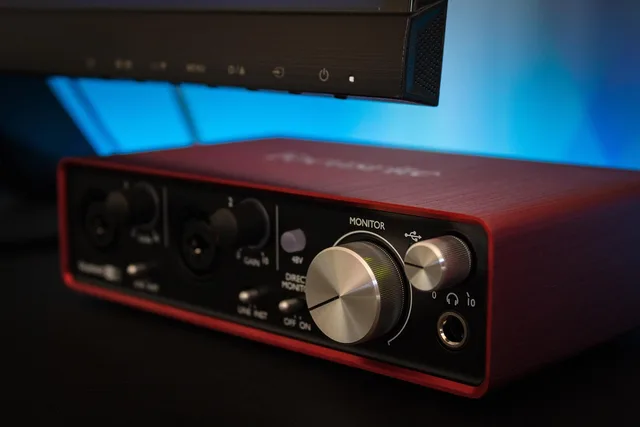
Two more capture features earn their keep. USB interface mode lets one box record to a card and feed a computer. Per-track gain and a headphone feed let a quiet guest and a loud host land at usable levels.
Sample rates above 48 kHz for spoken word do not change how a voice sounds through earbuds. Neither do preamps sold on musical warmth, channel counts beyond the number of people in the room, or built-in reverb presets.
Capture: what matters
What it is
- Zoom PodTrak P4
- Four-input recorder with per-track SD recording and USB interface mode
- Rode RodeCaster Duo
- Two-host mixer and interface with onboard processing
- Focusrite Scarlett 2i2
- Two-channel USB interface
- Shure SM7B
- Dynamic moving-coil microphone
- Audio-Technica AT2005USB
- Dynamic microphone with USB and XLR output
- Rode PodMic
- Dynamic XLR microphone with a built-in pop filter
- Shure MV7+
- Hybrid USB and XLR dynamic microphone with onboard DSP
- Zoom H6essential
- Six-track handheld recorder with 32-bit float capture
Who it suits
- Zoom PodTrak P4
- Solo hosts adding remote guests
- Rode RodeCaster Duo
- Two-host shows recording in one room
- Focusrite Scarlett 2i2
- Hosts who already record into a computer
- Shure SM7B
- Untreated rooms, close-mic technique
- Audio-Technica AT2005USB
- First setup, upgradeable later
- Rode PodMic
- Treated rooms feeding a mixer or interface
- Shure MV7+
- Solo hosts who want one microphone for both modes
- Zoom H6essential
- Field recording and multi-guest sessions
Pricing model
- Zoom PodTrak P4
- One-time purchase, about $199
- Rode RodeCaster Duo
- One-time purchase, about $699
- Focusrite Scarlett 2i2
- One-time purchase, about $200
- Shure SM7B
- One-time purchase, about $399
- Audio-Technica AT2005USB
- One-time purchase, about $79
- Rode PodMic
- One-time purchase, about $99
- Shure MV7+
- One-time purchase, about $279
- Zoom H6essential
- One-time purchase, about $299
Prices move. Check the manufacturer page before you budget.
Remote interviews are their own capture problem. Riverside and Zencastr both record locally on each participant's machine and upload afterward, which survives a dropped call. Riverside paid plans start around $15 a month and Zencastr around $18, both with free tiers that cap recording hours.
Zoom and Google Meet record the call, not the room. A local recording of a bad connection still sounds like a bad connection.
Edit: the features that earn their subscription
The feature that matters is a clean multitrack timeline with per-track volume automation. The second is a loudness meter that reads LUFS and true peak. Everything else is convenience.
Editing Tools Compared
Descript
- Best for
- Interview word cuts
- Price
- From $12/mo
- Key feature
- Edit by deleting text
Adobe Audition
- Best for
- Spectral repair
- Price
- About $23/mo
- Key feature
- Spectral display
Reaper
- Best for
- Learn-once DAW
- Price
- $60 or $225
- Key feature
- Batch rendering
Audacity
- Best for
- Single-track voice
- Price
- Key feature
- Free and open source
Descript transcribes the tape and lets you edit by deleting text. It suits interview shows where the work is cutting words, not shaping sound. The free tier covers a few hours a month, and paid plans start around $12 a month billed annually.
Filler-word removal and Studio Sound are the features people pay Descript for. The auto-generated show notes rarely ship unedited.
Adobe Audition is a full digital audio workstation with spectral repair tools. It suits shows that need to remove a specific noise from a specific second. Adobe sells it by subscription, about $23 a month for the single app inside Creative Cloud. The spectral display and the Essential Sound panel carry the value.
Reaper is a full workstation with a per-seat license that does not expire. It suits hosts who will learn a DAW once and keep it. The discounted license is $60, the commercial license is $225, and the trial runs 60 days. Item-level effects and batch rendering are what keep people on it.
Audacity is free and open source. It suits a single-track voice show with light editing. No cost. Its edits are destructive in older versions, so keep an untouched copy of the raw file.
Auphonic handles loudness normalization and leveling as a service. It suits hosts who want a consistent output level without learning a limiter. Two hours a month are free, and credit packs are typically about $11 for nine hours of audio.
The features that do not earn their subscription: AI show notes you rewrite anyway, automatic clip generation nobody posts, and per-episode mastering chains you cannot explain.
Loudness is not a preference. The AES and the European Broadcasting Union publish the -16 LUFS and -23 LUFS targets that streaming platforms reference, and a true peak ceiling near -1 dBTP. Check the current published figure with the platform you deliver to.
Host: where the money actually leaks
Hosting looks like a commodity and is not. Three numbers decide the bill: the storage cap, the bandwidth overage, and the export fee.
Hosting Costs and Caps
Libsyn
- Storage model
- Per-plan storage
- Starting price
- From about $5/mo
- Best for
- Large back catalogue
Buzzsprout
- Storage model
- Upload hours per tier
- Starting price
- About $12/mo
- Best for
- New shows
Transistor
- Storage model
- Unlimited downloads
- Starting price
- From about $19/mo
- Best for
- Multi-show networks
Storage cap. Every episode you have ever published sits on the host's disk. A show with 400 episodes and a 100-hour cap is over it. Buzzsprout counts upload hours per tier at about $12 a month for three hours, $18 for six, and $24 for twelve. Libsyn sells storage and bandwidth together, from about $5 a month.
Bandwidth overage. Most hosts include a monthly download allowance and bill per thousand downloads past it. A single viral episode can trigger the charge. Transistor advertises unlimited downloads from about $19 a month for one show, which is what that higher price buys.
Export or migration fee. Some hosts charge to hand you your own files. Ask before you sign, not when you leave. Confirm in writing that the host serves a 301 redirect from your old feed URL.
What it is
- Libsyn
- Long-running host with per-plan storage and bandwidth
- Buzzsprout
- Host with a simple dashboard and an episode cap per tier
- Transistor
- Host built for running several shows under one account
- Podbean
- Host with built-in monetization options
- Spotify for Creators
- Free hosting tied to Spotify distribution
- Captivate
- Host with dynamic ad insertion and per-episode analytics
- Acast
- Host with an ad marketplace and sales representation
Who it suits
- Libsyn
- Shows with a large back catalogue
- Buzzsprout
- New shows under about a dozen episodes
- Transistor
- Networks and multi-show owners
- Podbean
- Shows selling ads directly
- Spotify for Creators
- Shows that accept the trade
- Captivate
- Shows selling their own dynamically inserted ads
- Acast
- Shows chasing brand ad budgets
Pricing model
- Libsyn
- Monthly tiers, from about $5
- Buzzsprout
- Monthly tiers, about $12 to $24
- Transistor
- Monthly tiers, from about $19 per show
- Podbean
- Free tier; unlimited audio about $9 a month billed annually
- Spotify for Creators
- Free tier with limits
- Captivate
- Monthly tiers, from about $19
- Acast
- Revenue share, pricing quoted by sales
A free host is not free. The price is the data you cannot export and the ad inventory you cannot sell.
Set up the show once against the podcast production setup checklist for creators before you upload a back catalogue. Moving 200 episodes later is a weekend you will not get back.
Measure: which numbers change a decision
Most analytics dashboards report dozens of numbers and three that matter.
Three Analytics Numbers That Matter
- 7 daysDownloads per episode in first week
- 20%Completion rate example
- 1,000Actual audience at 5,000 downloads and 20% completion
- 90 daysSubscriber trend direction window
Downloads per episode in the first seven days. This is the number sponsors ask for. It is also the number most hosts report differently, so read the definition before comparing shows.
Completion rate. A show with 5,000 downloads and a 20 percent completion rate has an audience of 1,000. Sell the second number, not the first.
Subscriber trend. Direction over ninety days, not the absolute figure. A flat line with rising completion is a healthier show than a spike with falling completion.
A download is not a listen. The IAB Tech Lab Podcast Measurement Guidelines define which requests count. Ask a host or an ad network whether it follows that standard before you compare two shows.
Podtrac publishes free rankings and offers a certified prefix. OP3, run by Acast, is an open prefix that writes a download log you keep. Both can run alongside your host's own dashboard.
Spotify for Creators, Apple Podcasts Connect, and YouTube Studio each report their own figures, and none of them agree with the others. Pick one as the source of truth for sponsor conversations and say which one it is.
The features that do not matter: real-time listener maps, demographic guesses the platform will not stand behind, and any dashboard that cannot export a CSV.
Rights, disclosure, and records: the three authorities
Three external rules touch a podcast business, and each has an owner outside the show.
Music. The U.S. Copyright Office report on copyright and the music marketplace sets out how public performance and other uses can run through different rights and licensing paths. A streaming subscription does not cover a podcast download. ASCAP and BMI license performance rights. Confirm what your specific use needs with the rights holder or a media attorney.
Endorsements. The FTC guidance on endorsements, influencers, and reviews requires clear disclosure of material connections and truthful, non-misleading claims suited to the medium. A host-read ad for a product the host has never used is a disclosure problem, not a creative choice.
Records. The IRS guidance on what records to keep lets a business choose a system that clearly shows income and expenses, and keep documents supporting purchases, sales, payroll, and assets. Your entity and filing position sit with a CPA and your state revenue authority.
Workplace safety obligations attach to a studio as a workplace, not to a podcast as a hobby. The OSHA safety management guidance describes a proactive program that finds and fixes hazards before an injury or an inspection exposes them.
Cables across a walking path and a guest chair that collapses are the two most common studio hazards. Hearing exposure limits for long editing sessions sit with a qualified clinician, not with a blog.
A worked example: the $0 and the $180 studio
Two hosts, same show format, same 90-minute weekly episode.
The $0 and $180 Studio
Host A
- Capture
- USB mic, mixed track
- Editing
- Audacity, free
- Hosting
- Free tier
- Loudness
- None
- First-year spend
- $0
- Phone buzz fix
- Ships with the buzz
Host B
- Capture
- PodTrak P4, four tracks
- Editing
- Reaper, $60 license
- Hosting
- Transistor, $19/mo
- Loudness
- Auphonic free hours
- First-year spend
- About $488
- Phone buzz fix
- Removed in four minutes
Host A records a single mixed track through a USB microphone into Audacity, hosts on a free tier, and checks downloads once a month. Total tool spend: zero. When a guest's phone buzzes at minute 40, the episode ships with the buzz.
Host B records four tracks on a Zoom PodTrak P4 at about $200, edits in Reaper on a $60 discounted license, pays $19 a month for Transistor hosting, and normalizes loudness inside Auphonic's free monthly hours. Total first-year spend: roughly $488. The buzz comes out in four minutes.
Neither is wrong. Host A's show works if the room is quiet and the guests are careful. Host B is buying the option to fix a mistake after the guest has left.
Run the arithmetic with your own numbers: (monthly hosting + monthly editing subscription + monthly measurement tool) x 12, plus one-time capture and interface cost. Divide by episodes per year. That is your tool cost per episode. Compare it to what one sponsor read pays.
Common questions
Do I need a digital audio workstation at all?
For a single-host show recorded in one take, no. A free editor such as Audacity and a loudness service such as Auphonic cover it. You need a workstation such as Reaper when you are cutting between takes, removing a specific noise, or mixing music under speech.
Is a free hosting tier good enough to start?
For the first ten or so episodes, usually yes. The limit is not the episode count, it is the export. A tier like Buzzsprout's $12 plan caps you by upload hours per month, so check whether you can take your feed and your files with you before the back catalogue grows.
How often should I review the tool stack?
Once a quarter, against the four jobs. Cancel anything that fits none of them. Reopen the decision when your episode length, guest format, or sponsor requirements change.
What should I check before signing a hosting contract?
The storage cap, the bandwidth overage rate, and the export fee. Those three lines decide what leaving costs. Everything else on the pricing page is a feature you may never open.